Project Summary & Skills Used
For our Computing II final project, we developed an interactive job-search system designed to help users find suitable jobs across the United States. We saw a gap in the market because job searches like Indeed typically start by asking for your current location and then show jobs nearby. However, with today’s job market, many people do not have the luxury of staying where they already live. Our tool addresses this by letting users explore locations across the United States that have jobs matching their skills and preferences.
Our program allows users to rate how important salary, distance, and job match are to them on a 0–10 scale. They then enter their years of experience, select a job type, and describe what their “ideal job” looks like in their own words. Behind the scenes, our system embeds each job description into a 1024-dimensional vector using the BGE-3 sentence transformer model and computes cosine similarity between the user’s description and every job posting. We then use Vaadin to display a map with clusters that highlight “hot spots” for the user’s preferred types of jobs. After the user selects a cluster, the program ranks the jobs in that cluster according to their personalized weights.
From an Industrial Engineering perspective, this project incorporates multi-criteria decision making, data processing, machine learning–based text embeddings, and K-means clustering for geographic visualization. Together, these concepts support a practical, easy-to-use tool that helps users make more informed job-search decisions.
Skills Used
- Designing a reliable, easy-to-use Vaadin interface
- Object-oriented programming in Java
- AI integration and text embedding in Python
- K-means clustering using SMILE’s machine learning library
- Managing data in multiple formats (CSV, Parquet, NPY)
- Collaborative development, GitHub workflows, and team communication
Project Development Process
Initial Idea
Our project began with the idea of building a simple job selector where users could choose a few preferences and receive matching job options. Initially, we imagined something close to an advanced filter: choose salary range, preferred location, and experience level, and then see a list of jobs.
As we discussed the idea further, we realized that we could create a much more powerful system by using AI to understand job descriptions and by showing where opportunities exist geographically. This pushed the project beyond a basic filter into a full recommendation system that combined text understanding, scoring, and geographic visualization.
Evolution of the Design
As the design evolved, our development process turned into a multi-step pipeline that passed data between Python and Java.
- Python handled AI-generated job descriptions, embeddings, and similarity scoring.
- Java handled filtering, applying user-selected weights, clustering with SMILE, and displaying everything through a Vaadin interface.
To keep everything consistent, we used intermediary file formats such as CSV, Parquet, and NPY. Data would be generated or transformed in Python, saved to one of these formats, and then loaded in Java for further processing. This pipeline structure was not part of our original plan, but it became essential as the project grew more complex.
Challenges and How We Solved Them
Fit score alignment
One of the first major challenges was ensuring the fit score logic worked correctly. Our score combines cosine similarity, salary standardization, location preference, and user-selected weights. Getting Python’s output to match what Java expected required multiple rounds of testing, checking columns, and verifying that all transformations were applied in the right order.Map and clustering integration
Integrating the Vaadin map with K-means clustering introduced several issues. Missing latitude and longitude values, clustering mismatches, and layout ordering problems sometimes caused the map or markers not to display correctly. We resolved these problems by carefully tracing the data pipeline, reorganizing UI components, and ensuring that all geographic fields survived each filtering step.Data consistency across formats
Because data flowed through CSV, Parquet, and NPY files, even small inconsistencies (such as a renamed column or a filtered-out field) could cause downstream errors. We addressed this by standardizing our column names, centralizing certain filtering steps, and repeatedly validating that all required metadata (salary, experience, coordinates, IDs) was present at each stage.
Expectations vs. Results
In the end, our final system met and even exceeded our expectations. What began as a basic job-selection idea became a full AI-driven recommendation tool featuring dynamic clustering, personalized scoring, and a user-friendly map interface. Seeing each component finally connect was extremely rewarding and gave us valuable experience working across multiple technologies and languages.
Key Features or Highlights
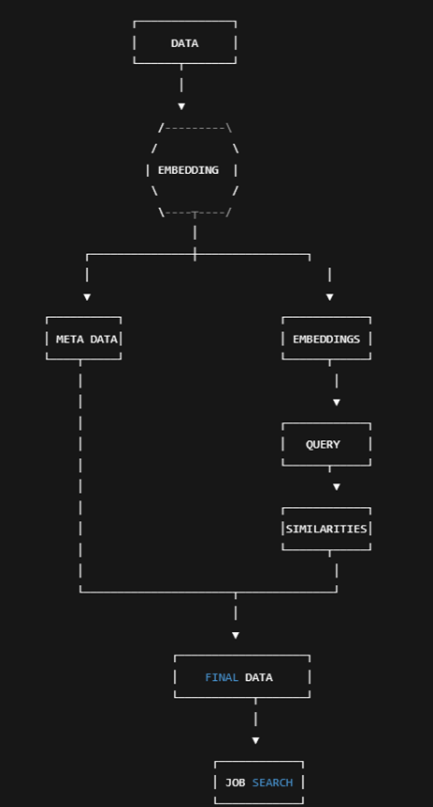
This project was particularly difficult to fit all the different pieces together. We were using tons of different libraries all with different syntax conventions. Seeing all the integration work together was very gratifying. We used intermediaries like csv, parquet, npy to create snapshots of our work and files. Every step of the process this single data was sent through so many different channels. It was sort of like an assembly line. In the real world with hundreds of systems working simultaneously this experience was very practical. A flow chart of this sequence is shown below to visualize our work and how all the AI work ends up back to the jobs for fit score.
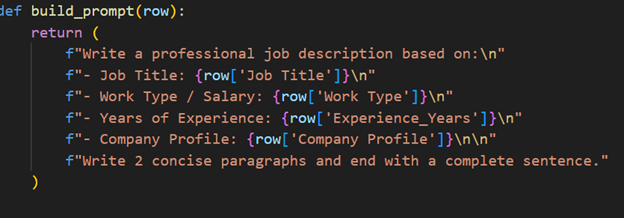
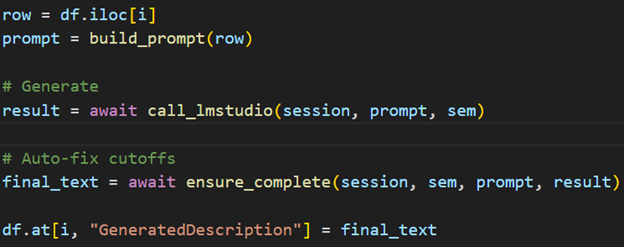
Another part we were proud of was the data generation aspect. It was exhausting and took around 50 hours to generate but was an eye-opening experience to the possibilities of AI. Our functionality went through each line and providing the AI only a job title, company description, and salary to write a 200 word job description. We were able to mess with the model parameters, something you can’t do from the main user interface on AI programs using python, which allowed us to use a lightweight model tailored to creative writing for speed. We changed the temperature which influences how random the generation is to make similar inputs create drastically different outputs. Moreover it allowed checkpoints to be saved along the way so we could start and stop. Code snippets are shown below
Finally the culmination of our project which was this final calculation showed the weaving of so many different working parts to get this ultimate output. It took the fit score from the program above, the salary score standardized relative to the job market for its relative benchmark, and the location score which evaluated whether the job was in the user’s desired cluster, picked from our complex clustering map. Finally it incorporated the user input which were weights on these scores to account for their preferences. It did this for every row to find the best overall jobs.
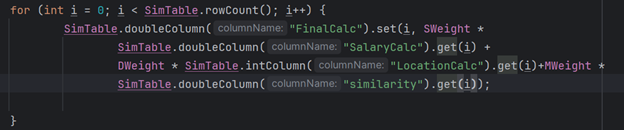
The code snippets above demonstrated the complex nexus of so many components all to come together to provide professional job recommendations. Thousands of computations all working in the background to come together for a common purpose.
Reflection
Working on this project gave me valuable experience in translating technical ideas into a functional auser interface. My primary responsibility was designing and implementing the Vaadin UI, which meant ensuring that all of the complex backend logic—from embeddings and similarity scoring to clustering and file processing—could be presented to the user in a clear and meaningful way. This was a difficult part of the project, but also where I experienced the most growth.
What I Learned
Throughout the project, I learned how to:
- Structure Vaadin layouts so that components remain readable, responsive, and logically organized
- Debug UI issues that were caused by deeper data or pipeline problems, not just layout mistakes
- Connect Java-based UI elements to Python-generated data outputs
- Manage event listeners, dynamic updates, and component visibility
- Think about the user’s perspective and design workflows that feel natural rather than technical
I also gained a stronger understanding of how front-end and back-end systems interact. Even though the UI seems like the “final layer,” it became clear that designing it well required understanding every step that happened beforehand.
My Contributions
My main contributions included:
- Building the structure of Page 1, including dropdowns, text fields, headers, and formatting
- Implementing and adjusting the Vaadin Map component so that clusters and labels displayed correctly
- Ensuring that the map and results section updated dynamically when the user selected a cluster
- Designing a clean top section where users could set their preferences and write their job description
- Fixing issues with components not rendering, misaligned layouts, and header placement
I also assisted in tracking down UI problems caused by missing data fields or out-of-order processing, which required coordination with the rest of the team and a deeper understanding of the entire pipeline.
Personal Growth
Before this project, I had limited experience working with UI frameworks, especially ones like Vaadin that integrate with Java back ends. By the end, I felt much more confident in:
- Building UI components from scratch
- Structuring multi-layer layouts
- Handling dynamic content updates
- Troubleshooting problems that involved both UI and backend logic
- Making design decisions that prioritize user experience
This project showed me how important it is for a system to not only work correctly behind the scenes but also present information in a way that users can understand and act on. Working on the UI helped me think like both a developer and a user, and it is a skill set I am excited to continue building. Overall, this experience gave me a clearer picture of how full applications come together, and it strengthened my confidence in both front-end design and system integration.